
Adobe Acrobat Reader: Edit PDF
🤖 Androidby Adobe
From the first PDF to today’s AI-powered hub, Acrobat Reader sets the standard.
Productivity
4.5 (7.6M ratings)
$0.00 Est. Downloads
500.0M
Est. Revenue
N/A
Last Updated
Mar 19, 2026
Version
N/A
About Adobe Acrobat Reader: Edit PDF
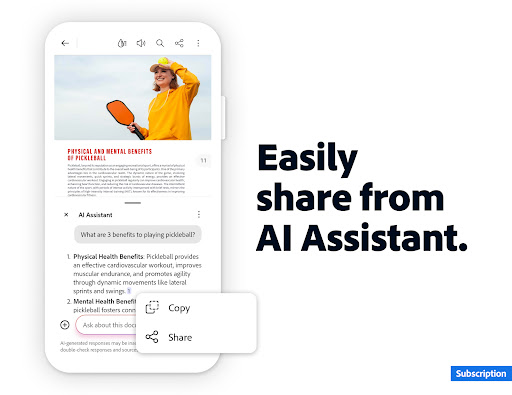
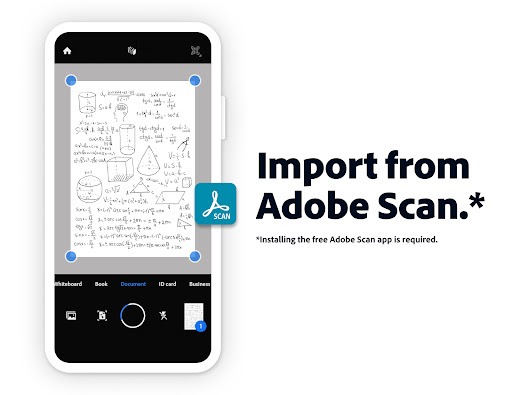
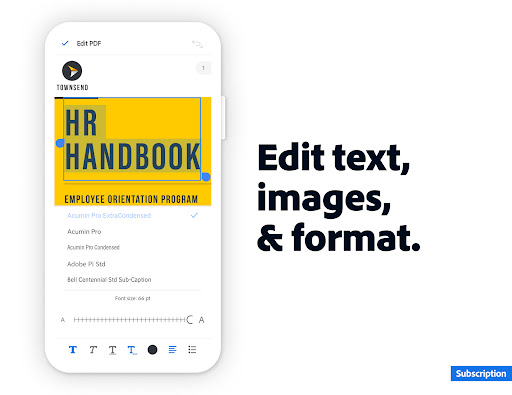
<h1>Major new update</h1>Major new updates: Collaborate and share your files in PDF Spaces, turn your document summaries into podcast-style audio, and create standout content in Acrobat Reader with design tools powered by Adobe Express.<br><br>The world’s most trusted PDF reader, PDF editor, and PDF maker with more than 635 million installs. View, share, annotate, add comments, and sign documents - all in one app. You can store your files online and read documents anywhere.<br><br>Get your 7-day free trial and try all the features of Acrobat Reader.<br><br><h1>Paid features</h1><b>Adobe Acrobat AI Assistant</b><br>• Work across multiple files in one place with PDF Spaces. Collaborate, store, and use AI Assistant across files<br>• Use voice or text prompts with AI Assistant chatbot <br>• Ask questions and get cited answers about details in your document, including charts, graphs, and tables with Figures Q&A<br>• Easily share the responses you get<br>• Try voice support to ask queries and have answers read aloud. <br>• Instantly generate summaries from your PDFs with Generative AI Summaries <br>• Get content for emails, text, study notes, blogs, and more<br><br>[Adobe Acrobat AI Assistant is a paid feature*, free for a limited time]<br><br><b>Edit PDFs</b><br>• With our PDF editor, edit text and images directly in your PDF (mobile only)<br>• Fix typos or add paragraphs with the PDF editor<br>• Easily add, delete, or rotate any image<br>• Use this PDF signer and PDF viewer to get your docs just right<br><br><b>Recognize text</b><br>• Optical Character Recognition (OCR) turns scanned PDFs into searchable, editable text to use in other formats<br><br><b>Merge & organize PDFs with PDF converter</b><br>• Split or combine multiple files into one PDF with PDF converter<br>• Use the PDF editor to insert, delete, rotate, crop & reorder pages in your PDF file<br><br><b>Create, convert & export PDFs</b><br>• Easily convert to PDF from any file type including Microsoft, Google Docs, and images<br>• Export and convert PDFs to Microsoft Word, Excel, PowerPoint, or various image files<br>• Convert web pages to PDFs <br><br><b>Compress & highly secure PDFs</b><br>• Compress PDF files for easy saving and sharing<br>• Password Protect PDF documents<br><br><b>Have your PDF read aloud</b><br>• Listen to your PDFs on the go, great for reading support<br>• Choose free voices or upgrade for high-quality options<br><br>Subscribe now to access all these features and use Acrobat across mobile and web platforms.<br><br><h1>Free-to-use features</h1><b>PDF signer: Fill & Sign</b><br>Adobe Fill & Sign is free & available in Acrobat Reader. A form filler and PDF signer that lets you fill, sign, and send<br><br><b>Liquid mode for optimal PDF viewing</b><br>• Get the best PDF reading experience with this PDF viewer<br>• Search, navigate & adjust font size or spacing to fit your screen<br><br><b>Annotate PDFs</b><br>• Add sticky notes, comments, and highlight text<br><br><b>Store & manage files</b><br>• Link online storage accounts like Microsoft OneDrive, Dropbox, or Google Drive<br>• Star files to quickly open important documents<br><br><b>Connect the PDF viewer and reader to Google Drive</b><br>• A PDF creator that lets you edit, compress, and export Google Drive files with a subscription<br><br><b>Work with scanned documents</b><br>• Access scanned PDFs from Adobe Scan in Acrobat to fill, sign, and share<br><br>The Acrobat Reader mobile app is designed to work with customers who have Enterprise Mobility Management (EMM) enabled.<br><br>An Adobe Acrobat AI Assistant add-on plan is available to Acrobat Individual customers.<br><br>Terms & Conditions:<br>Your use of this application is governed by the Adobe General Terms of Use http://www.adobe.com/go/terms_en and the Adobe Privacy Policy http://www.adobe.com/go/privacy_policy_en<br><br>Do not sell or share my personal information www.adobe.com/go/ca-rights
Screenshots





Scroll to see more screenshots
Ranking History
Performance Trends
Collecting performance data...
Recent Reviews
Collecting reviews...
SDK Intelligence
Analyzing SDK usage...
Top Competitors


App Details
- Size
- N/A
- Requires
- N/A
- Content Rating
- Everyone
- Release Date
- May 24, 2010
Version History
Collecting version history...
Want More Insights?
Get full access to downloads, revenue, keywords, and competitor data.
Start Free TrialNo credit card required