
Samsung Flow
🤖 Androidby Samsung Electronics Co., Ltd.
A magical experience that seamlessly connects your devices.
Productivity
3.3 (22.5K ratings)
Free Est. Downloads
50.0M
Est. Revenue
N/A
Last Updated
Dec 29, 2025
Version
N/A
About Samsung Flow
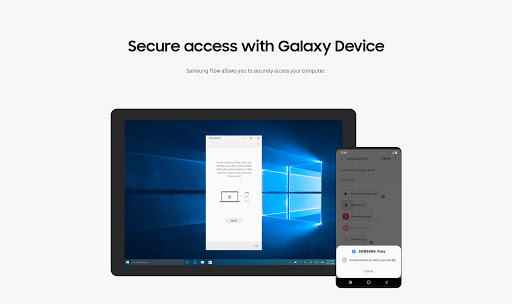
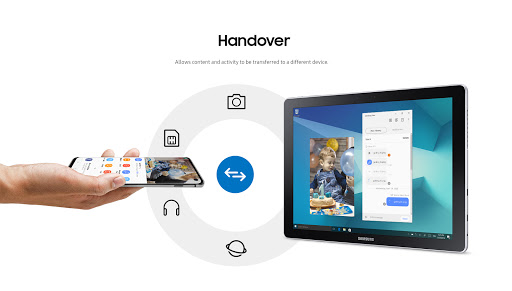
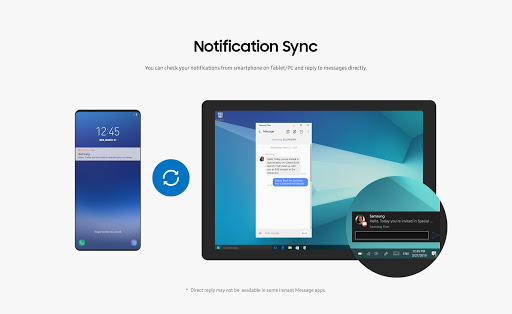
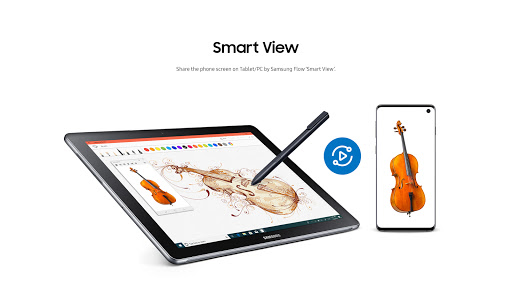
Samsung Flow is a software product that enables a seamless, secure, connected experience across your devices. You can authenticate your Tablet/PC with your smartphone, share content between devices, and sync notifications or view contents from your smartphone on your Tablet/PC. You can turn on the smartphone's Mobile Hotspot to keep your Tablet/PC connected.<br>You can also log in to your Tablet/PC with your biometric data (Iris, Fingerprints) if you register with Samsung Pass.<br><br>The following devices support Samsung Flow:<br>1. Windows Tablet/PC : Windows 10 OS Creators update (V1703) and June patch build (15063.413)<br>(Galaxy TabPro S, Galaxy Book, Galaxy Book2. Galaxy Book S, PC)<br>2. Android Tablet: Android N OS or newer <br>3. Android Phone : Android N OS or Newer<br>It may not be supported by some models, depending on the smartphone specifications.<br><br>* Samsung Flow will operate only on official software released by Samsung Electronics.<br>* Windows: Bluetooth (Bluetooth LE optional) or Wi-Fi/LAN, Wi-Fi direct<br><br>Windows 10 users can find the Samsung Flow app on the Windows App Store.<br>Go to the Samsung Flow webpage where you can find the setup guide: <br>www.samsung.com/samsungflow<br>If you have not updated the Samsung Flow app to the latest version, please go to Windows Store > Menu > Downloads and Updates to update the app.<br><br>* The PC unlock function is no longer provided because the Windows policy has changed.<br><br>The following permissions are required for the app service. For optional permissions, the default functionality of the service is turned on, but not allowed.<br>Required permissions<br>• Nearby devices: Used to find nearby devices and track registered devices<br>• Notifications: Used to show the connection status between your devices<br>• Storage: Used to store content shared among registered devices on an external storage device and view the stored content (~Android 10)<br>Optional permissions<br>• Phone: Used to answer and decline calls to your phone on your tablet or computer<br>• Call logs: Used to read the contact information included in the event of the incoming call when receiving a call<br>• Contacts: Used to obtain information about callers or senders when you receive calls or text messages on your phone<br>• SMS: Used to receive and reply to text messages to your phone on your tablet or computer<br>• Microphone: Used to record and send the audio from your phone to your computer or tablet while using Smart View<br>• Location: Used to search for your phone using your tablet or computer connected through Bluetooth (~Android 12)
Screenshots
Scroll to see more screenshots
Ranking History
Performance Trends
Collecting performance data...
Recent Reviews
Collecting reviews...
SDK Intelligence
Analyzing SDK usage...
Top Competitors

App Details
- Size
- N/A
- Requires
- N/A
- Content Rating
- Everyone
- Release Date
- Mar 2, 2016
Version History
Collecting version history...
Want More Insights?
Get full access to downloads, revenue, keywords, and competitor data.
Start Free TrialNo credit card required