
Screen Recorder - XRecorder
🤖 Androidby InShot Inc.
Record games with audio. Smooth, HD screen capture & Built-in video editor.
Video Players & Editors
4.7 (7.6M ratings)
$0.00 Est. Downloads
100.0M
Est. Revenue
N/A
Last Updated
Mar 25, 2026
Version
2.5.0.1
About Screen Recorder - XRecorder
<b>NO watermark</b><br><b>NO root needed</b><br><b>NO recording time limit</b><br><br>Screen Recorder & Video Recorder - XRecorder helps you capture <b><font color="#D2001E">smooth & clear</font></b> screen videos, screenshots in the easiest way. Just with a tap on the floating ball, you can record HD video tutorial, video calls and <b><font color="#D2001E">videos that can not be downloaded</font></b>. And you will never miss <b><font color="#D2001E">live game shows</font></b>, and important moments anymore. <br><br>Download XRecorder to capture anything you like!<br><br>🏅<b>TOP FEATURES</b>:<br>● Capture screen to take a clear <b>Screenshot</b><br>● Record <b>Gameplay</b> on your phone<br>● <b>Internal audio recording</b> without noise (ONLY Android 10 or above)<br>● YouTube & RTMP Live stream: be a gaming streamer to gain fun and popularity<br>● <b>Facecam</b>: express reactions freely with multiple camera switch <br>● <b>Brush Tools</b>: draw on the screen to make your screen capture extra special<br>● <b>Video Editor</b>: trim, <b>remove the middle part, add music</b> and speed control<br>● Maximum <b>120 FPS</b> recording support to enjoy the ultimate visual experience<br>● Export <b>Full HD</b> video with custom settings: <b>240p to 1080p, 60FPS, 12Mbps</b><br><br><br><b>Pro Video Recorder</b>:<br>● Customize <b>floating ball style & opacity</b>: a tailor-made one only for you<br>● One-tap Trash control: Enable or Disable it as you like<br>● <b>No watermark</b>: record a clean video & screenshot<br>● No recording time limits & No root needed<br>● <b>Floating window</b>: One touch to snap the exact moment or hide it when it’s not needed<br>● <b>Custom Floating Window</b>: show recording time or minimize it & replace button function<br>● <b>Countdown timer</b>: to be a fully prepared recorder<br>● <b>Trash Bin</b>: immediately recover deleted photos, videos, etc. within 3 days<br>● Alternative storage location: internal storage/ <b>SD card</b><br>● Easy to pause/resume recording, rotate screen<br><br><br><b>Video Recorder with multiple editing tools</b><br>● Video trimmer: Trim, Cut and Split video to make it a better artwork <br>● Crop & Rotate video left, right or any other angle <br>● VIdeo for all platforms: adjust Ratio and Background fit for any occasion<br>● Music video maker: add popular music in your video <br>● Funny Sticker and Text to personalize your screen capture<br>● Stylish Filters: Story, Vintage, Lomo, etc. always a right for you<br>● Speed up/Slow down to adjust video pace <br>● Save as draft to make continuous editing possible<br><br><br>📼<b>Screen Recorder in FULL HD</b><br>Screen Video Recorder - XRecorder supports recording game screen in the highest quality, 1080p, 12Mbps, 60FPS. Of course, you can record screen with adjustable resolution(240p to 1080p), quality, and FPS(15FPS to 60FPS).<br><br>🎉<b>Screen Recorder with Facecam</b><br>Screen Recorder with Facecam helps you record your face and reaction in a small overlay window. It can be dragged freely to any position on the screen and customized to any size.<br><br>🏆<b>Game Recorder with no Time Limit</b> <br>Still looking for a gameplay video recorder to witness glorious moments? Just try XRecorder to enjoy the smoothest gameplay screen capture. It helps you record gameplay video without time limit. <br><br>📹<b>Screen Video Recorder with no Watermark</b><br>Still find a screen capture tool without watermark? Download this video recorder to capture screen in a cleaner way. If you want to capture screen, record screen or take a screenshot efficiently, it is a must-have screen recorder.<br><br>🎧<b>Screen Recorder with Audio</b><br>Want to record gameplay, video tutorial with audio? This powerful screen recorder with audio/sound will record your voice & internal audio fluidly and clearly. Download this fantastic screen recorder with audio - XRecorder to record your own video now.<br><br>Thanks for downloading Scre
Screenshots


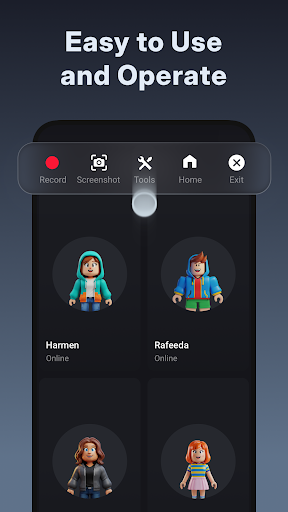
Scroll to see more screenshots
Ranking History
Performance Trends
Collecting performance data...
Recent Reviews
Collecting reviews...
SDK Intelligence
Analyzing SDK usage...
Top Competitors





App Details
- Size
- N/A
- Requires
- 8.0
- Content Rating
- Everyone
- Release Date
- May 10, 2019
Version History
v2.5.0.1 Latest
Mar 25, 2026
🌟New<br>New Sticker Packs: One-tap fun to express your unique style!<br><br>Update XRecorder to start a better recording experience!<br><br>Join us at: https://www.reddit.com/r/XRecorder/<br>Email us at: xrecorder.feedback@gmail.com
Want More Insights?
Get full access to downloads, revenue, keywords, and competitor data.
Start Free TrialNo credit card required