
Est. Downloads
N/A
Est. Revenue
N/A
Last Updated
Aug 24, 2026
Version
1.0.0
About My Plan: Progress Cards
This app is designed for those who want to see their day and their tasks clearly, consistently, and without chaos. It helps you map out plans, organize your schedule, and manage complex tasks through clear steps—calmly, clearly, and logically.
The app is built around working with dates. You start with a simple action: adding a day, setting a specific date. Each day becomes a separate space within which a unique schedule is formed. This isn't an endless list of tasks, but a clear structure: one day—one set of cards with its own time and order.
Within a day, you add cards, specifying their due dates. All cards are automatically organized in the correct time sequence. Even if you initially added tasks for the morning and evening, and then remembered a task later during the day, it will find its logical place between them. No confusion; everything is always sorted by time.
A column with entered times is displayed on the left—it helps you quickly navigate your schedule. Tapping on a time highlights the corresponding card, and tapping on a card reveals all notes and details. Time always flows sequentially, without any random ordering, creating the feeling of a neat and organized day.
Each day card is individually customized:
A title is set, which is displayed in the preview,
The date is automatically set for the selected day,
The time is manually entered,
A text block with notes and details is added.
Cards can be edited or deleted at any time—the schedule remains flexible and lively, not fixed forever.
Multi-stage cases
In addition to daily planning, the app supports multi-stage tasks—for tasks that cannot be completed in a single step.
You create a separate task card and fill in the following:
title,
brief description of the task,
visual icon (work, reading, exercise, shopping, etc.),
completion stages.
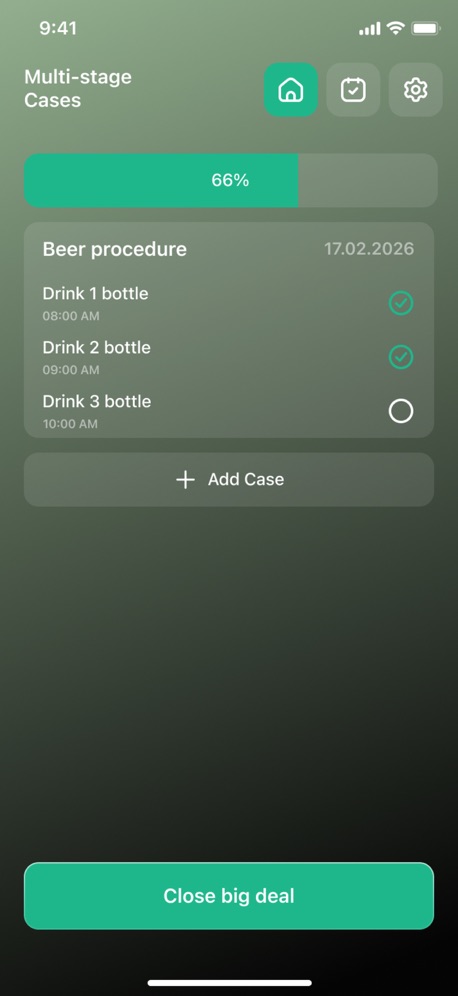
Stages are added sequentially: first the first step, then you can add new stages by clicking the "+" button, describing each one. Completion of stages isn't tied to a strict order—you check off the steps you've already completed in any convenient order, just like in real life.
Each stage has equal weight. If a task consists of 5 stages, each completed stage fills 20% of the card. There are no priorities, difficulty levels, or ratings—only honest and visible progress.
Task completion is visible directly in the card preview on the main screen: it gradually fills with color as you complete stages. This allows you to see at a glance which tasks are in progress and which are nearing completion.
Cards that are 100% complete are automatically moved to the bottom of the list. Focus remains on the tasks that still require attention, without unnecessary visual clutter.
App Philosophy
This app doesn't force productivity or impose rules. It doesn't require you to prioritize, assess difficulty, or compete with yourself. Its purpose is to provide a clear, easy-to-navigate structure:
what's planned for a given day,
what's already been accomplished,
what's in progress,
what steps remain.
The app is suitable for everyday tasks, work projects, personal tasks, and anything else that needs to be kept under control—calmly, consistently, and clearly.
Privacy Policy:https://doc-hosting.flycricket.io/my-plan-progress-cards-privacy-policy/953e2f06-784c-4ef3-8249-ab2dc0d54399/privacy
Term of Use:https://doc-hosting.flycricket.io/my-plan-progress-cards-terms-of-use/e5d6972f-a4b3-4c26-88ad-6383d8de298e/terms
Screenshots


Scroll to see more screenshots
Ranking History
Performance Trends
Collecting performance data...
Recent Reviews
Collecting reviews...
SDK Intelligence
Analyzing SDK usage...
Top Competitors


App Details
- Size
- 29.0 MB
- Requires
- 14.5
- Content Rating
- 4+
- Release Date
- Aug 24, 2026
Version History
v1.0.0 Latest
Aug 24, 2026
Want More Insights?
Get full access to downloads, revenue, keywords, and competitor data.
Start Free TrialNo credit card required