
Est. Downloads
N/A
Est. Revenue
N/A
Last Updated
Aug 14, 2026
Version
1.0.0
About The Anti-Trophy Case
In a world where every app encourages you to be more productive, faster, and more efficient, this app offers the opposite philosophy—valuing the moments when you choose to do nothing.
This is a wry and somewhat therapeutic anti-achievement tracker, where rewards are given not for actions, but for consciously resisting them: not going to a loud party, not getting into an argument, not buying an unnecessary item, not opening a work chat in the evening.
Here, every "not done" turns into an anti-trophy—a small reward for conserved energy, money, time, or inner balance.
The user records moments when they intentionally avoided something and adds it to their "doing nothing" collection. Over time, this becomes a kind of diary of calm, self-irony, and conscious pauses.
Main Screen
The main screen serves as a quick entry point for adding a new anti-trophy.
The "Add Anti-trophy" button opens the entry creation form. The user briefly describes what exactly they didn't do and adds an explanation of why they are receiving a reward—for example, saved energy, peace of mind, money, or time.
Each event is assigned a level of inaction—a kind of avoidance mastery scale:
1 — Almost did it
2 — Soft skip
3 — Properly avoided
4 — Expert non-action
5 — Legendary nothingness
You can also select the type of anti-trophy, leave a short comment, and save the entry.
Below the form is the "Last Anti-trophy" section, where the user sees their most recent victory over unnecessary actions: what they didn't do, what they received a reward for, their level of inaction, and the date.
From the main screen, you can navigate to the following sections:
Trophies
Levels Log
Stats
Settings
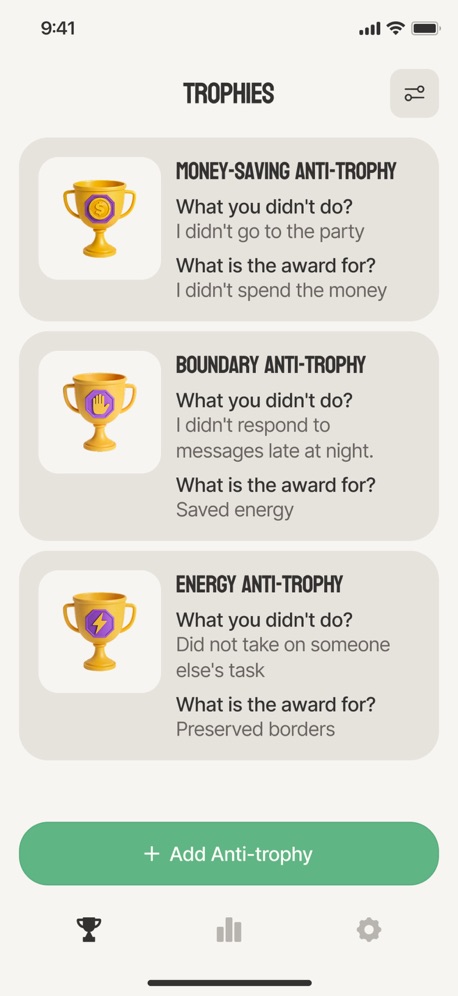
Trophies
The Trophies screen is a collection of all the anti-trophies you've earned.
Each entry shows:
what the user didn't do
what they received a reward for
idling level (1-5)
anti-trophy type
date
For convenience, you can sort entries:
by date
by idle level
by anti-trophy type
Filters are also available:
All
Low levels (1-2)
Medium level (3)
High levels (4-5)
Clicking on an entry opens a full detail screen: the full event text, comment, level, type, and date. Edit and Delete actions are also available here.
If there are no entries yet, a quiet, empty state is displayed:
"Your anti-trophy showcase will go here."
Levels Log
The Levels Log screen shows how the user is progressing along the idleness meter.
Five horizontal level blocks are displayed:
1 — Almost did it
2 — Soft skip
3 — Properly avoided
4 — Expert non-action
5 — Legendary nothingness
Each block displays:
the total number of anti-trophies for that level
the last few entries
Clicking on a level opens a list of all anti-trophies for that level.
An additional feature is Random anti-trophy: the app displays a random entry from the selected level.
There is also an interactive mini-game called Compare Two.
The app displays two anti-trophies, and the user chooses which has the higher level of non-action. After choosing, the correct answer and the levels of both entries are displayed.
Stats
The Stats screen turns your anti-trophy collection into visual statistics.
The user can see:
total number of anti-trophies
average level of idleness
number of times each level (1-5) was reached
most frequent level
least frequent level
Additional metrics help understand one's own avoidance habits:
Days of maximum idleness—days where levels 4-5 were most frequently encountered.
Mild abstinence—days where levels 1-2 predominate.
The distribution of anti-trophies by type is also displayed as a diagram.
Another metric is a series of days in which the user added at least one new anti-trophy.
Privacy Policy: https://doc-hosting.flycricket.io/the-anti-trophy-case-privacy-policy/50e9c7ad-0afc-4d2b-a1e5-ace4855d6126/privacy
Term of Use: https://doc-hosting.flycricket.io/the-anti-trophy-case-terms-of-use/0e12133a-43c9-483a-a0e7-579209116da1/terms
Screenshots



Scroll to see more screenshots
Ranking History
Performance Trends
Collecting performance data...
Recent Reviews
Collecting reviews...
SDK Intelligence
Analyzing SDK usage...
Top Competitors


App Details
- Size
- 22.7 MB
- Requires
- 14.5
- Content Rating
- 4+
- Release Date
- Aug 14, 2026
Version History
v1.0.0 Latest
Aug 14, 2026
Want More Insights?
Get full access to downloads, revenue, keywords, and competitor data.
Start Free TrialNo credit card required