
Est. Downloads
N/A
Est. Revenue
N/A
Last Updated
Aug 29, 2026
Version
1.0.0
About The Glass Blower's Bane
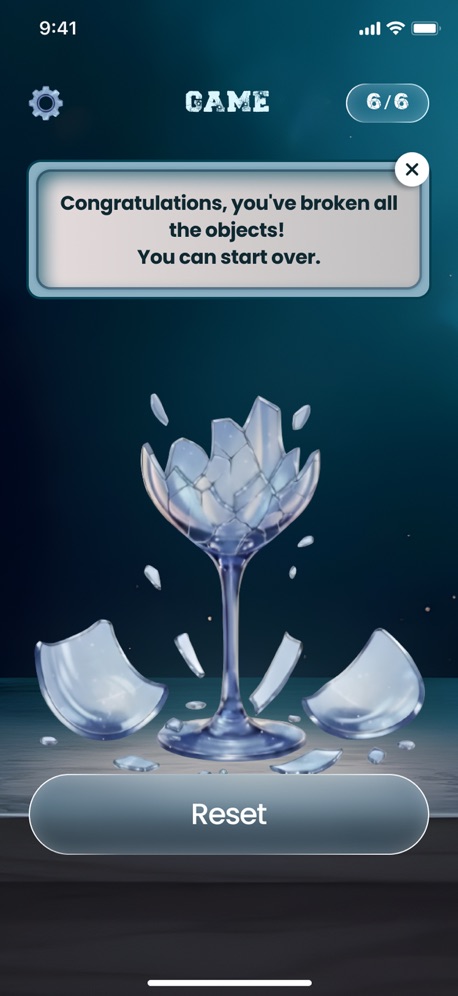
This minimalist, almost meditative app explores the fragility of form and the beauty of destruction. The user is encouraged not to create, but to destroy—slowly, methodically, and mindfully. Each tap becomes an act of micro-action, triggering a chain reaction of cracks in the perfectly transparent glass.
Main Screen
The main screen features a dark, understated aesthetic. The smooth, slightly glossy background is reminiscent of a velvet museum display case or a cool marble pedestal. Soft, directional lighting emphasizes the transparency and play of light in the glass. The central object is an elegant glass form: a thin-walled vase, a graceful animal figurine, or an abstract sculpture.
The object is initially flawless—perfectly clean, shiny, reflective, and evoking a sense of museum value.
The user initiates interaction with simple taps.
Each touch is accompanied by a subtle tactile feedback, intensifying as the user moves through new stages of destruction. Visual changes occur gradually, creating a sense of suspense.
Stages of Destruction:
Pristine Glass — a whole, shining, completely transparent object. Perfection of form.
Hairline Fractures — barely noticeable, fine cracks appear, like microscopic stress lines within the glass.
Spiderweb Cracks — the cracks grow, forming a complex web-like network. The object still stands.
Chipped & Fragmented — small pieces begin to break off. The outline changes, the fragments shift slightly.
Broken Shards — the form disintegrates into large, sharp shards. Integrity is lost, but the remains lie on the pedestal.
Shattered Dust — the object finally crumbles into numerous small, shiny shards and glass dust. The dust slowly disappears or falls away, leaving a blank surface—ready for a new piece.
A minimalist counter of broken objects is located in the upper corner of the screen—a silent marker of your "destruction collection."
After complete destruction, a new, perfectly intact object of the selected type appears, and the cycle begins again.
Settings screen
Haptic Feedback — Enable or disable haptic feedback.
Object Type — Select the next object:
Vase
Sculpture
Glass
Reset Progress — Reset the counter of broken objects.
Privacy Policy: https://doc-hosting.flycricket.io/the-glass-blower-s-bane-privacy-policy/93cb4960-633e-4579-8f7e-a11653449cdc/privacy
Term of Use: https://doc-hosting.flycricket.io/the-glass-blower-s-bane-terms-of-use/5c7c9b42-f470-45ea-b184-440bc9b389ca/terms
Screenshots


Scroll to see more screenshots
Ranking History
Performance Trends
Collecting performance data...
Recent Reviews
Collecting reviews...
SDK Intelligence
Analyzing SDK usage...
Top Competitors


App Details
- Size
- 28.5 MB
- Requires
- 14.5
- Content Rating
- 4+
- Release Date
- Aug 29, 2026
Version History
v1.0.0 Latest
Aug 29, 2026
Want More Insights?
Get full access to downloads, revenue, keywords, and competitor data.
Start Free TrialNo credit card required