
Est. Downloads
N/A
Est. Revenue
N/A
Last Updated
Aug 27, 2026
Version
1.0.0
About The Crack Tracker
This is a tool for visually inspecting the condition of wooden structures—from garage beams to decking and kitchen countertops. The app helps you date cracks in wood, track their progression, and maintain a structured history of changes.
It's suitable for homeowners, craftsmen, builders, inspectors, furniture restorers, and anyone who works with natural wood and wants to monitor its condition.
The main idea is not just to photograph the defect, but to create a consistent timeline: when the crack appeared, how it changed, whether it deepened or remained stable.
Main Screen
Minimalist interface with an emphasis on action.
The "Photograph Crack" button opens a menu:
• Take a photo
• Select from gallery
After selecting a photo, the user can crop the image, adjust the perspective, and focus only on the crack itself, eliminating unnecessary details.
Next, fill out the fixation form:
• "Location" field (up to 30 characters) — to clearly identify the location of the defect: "garage beam," "kitchen board," "deck — section A."
• "Wood type" field — free entry: "pine," "oak," "plywood," "larch," etc.
• "Crack orientation" field — horizontal, vertical, or diagonal.
• Severity level (Severity 1–5):
1 — hairline
2 — minor
3 — moderate (visible)
4 — major (deep)
5 — structural (structural integrity compromised)
• Comment (up to 80 characters) — brief notes about humidity, temperature, recent repairs, or observations.
The "Save" and "Cancel" buttons complete the process.
Below on the main screen is the "Last Captured" section—a mini-preview of the photo, location, severity level, and date taken. This allows you to quickly see the current status without having to go to the log.
Cracks Log Screen
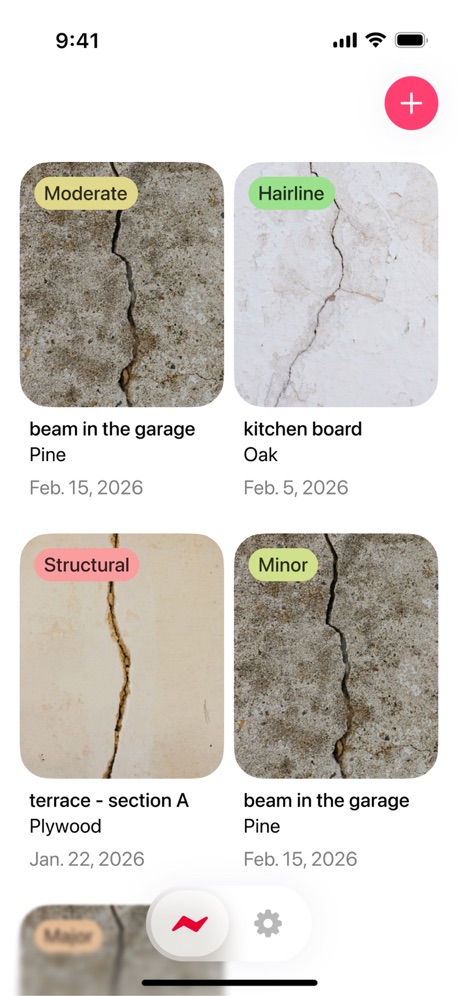
The crack log is formatted as a 3x4 grid. Each card includes:
• photo preview
• location
• severity (1–5 with a color label: from neutral to alarming)
• last capture date
Sorting options are available:
• by date
• by severity
Swiping on a card opens quick actions:
• edit entry
• delete
• add a new photo to the same crack
Tapping on a card opens a detailed history of the defect.
If there are no entries yet, the screen displays the message:
"The log is empty. Take a photo of the crack to record the beginning of the history."
Crack Details Screen
This is where the history of a specific crack is stored.
The top section is a large photo with the ability to switch between dates. You can visually compare the first and last states and assess the dynamics.
The information block contains:
• location
• wood type
• orientation
• current severity level
• dates of first and last photo
Buttons:
• Add photo — add a new photo (camera / gallery)
• Delete frame — delete an individual photo if it was unsuccessful
This way, each crack becomes a separate observation history, rather than a disjointed set of photos.
Privacy Policy: https://doc-hosting.flycricket.io/the-crack-tracker-privacy-policy/2ce9909c-eba2-4ca2-8bc9-fbde88b71495/privacy
Term of Use: https://doc-hosting.flycricket.io/the-crack-tracker-terms-of-use/4195441b-4243-48a9-a78b-d7b1c91ccb7c/terms
Screenshots



Scroll to see more screenshots
Ranking History
Performance Trends
Collecting performance data...
Recent Reviews
Collecting reviews...
SDK Intelligence
Analyzing SDK usage...
Top Competitors


App Details
- Size
- 22.6 MB
- Requires
- 14.5
- Content Rating
- 4+
- Release Date
- Aug 27, 2026
Version History
v1.0.0 Latest
Aug 27, 2026
Want More Insights?
Get full access to downloads, revenue, keywords, and competitor data.
Start Free TrialNo credit card required